
This post is a continuation of my previous post explaining how students can use credit cards to their advantage and can be read here.
Apart from credit cards, there are several other ways of which students can take advantage of to offset their cost of living in the USA.
Rent and food form a major component of living expenses here out of which rent is always fixed. Food expense, on the other hand, if you are like me and don’t like to cook you might end up spending a lot on food. I found these certain ways helpful in cutting down my food expenses.
-
- Dining dollars: First, if you load 100$ in your card in the form of dining dollars, you get 10$ extra credit (note it should be done through 1 Capen office and not online portal). Second, when you pay for food via dining dollars, you save an extra 8.8% on taxes. That comes out to be around 20% in saving on your food. Just imagine, you are saving 1-2$ every time you get food. Apart from food, you also save the same amount on coffee at Tim Hortons. So I always recommend people using dining dollars for buying food or coffee at the UB cafeteria except for UB common where they accept campus cash and not dining dollar.
- Cash app: Its an app, me and my friends regularly use for sending money to each other or paying rent. Recently, they introduced this debit card which comes with exciting offers or boosts like 1$ off on every coffee purchase (anything from Tim Hortons or Starbucks), 10% off of doordash orders, 5$ off on groceries and many more. My friends and I use this card extensively to get coffee or doughnuts, after all getting 1$ off on any purchase is always exciting. Although they come with certain restrictions, still they helped me save a lot of money on coffee or any snacks from Tim Hortons.


- Ebates: Ebates is another app that I have used extensively to save a lot of money on online purchases especially while traveling (booking for hotels or flights). It’s a website/app is owned by Rakuten (one of Japan’s largest eCommerce website), which routes you via their affiliate link and shares most of the affiliate commission back with you. If you have their chrome extension, it prompts you every time if a site has cashback as seen in the image below.
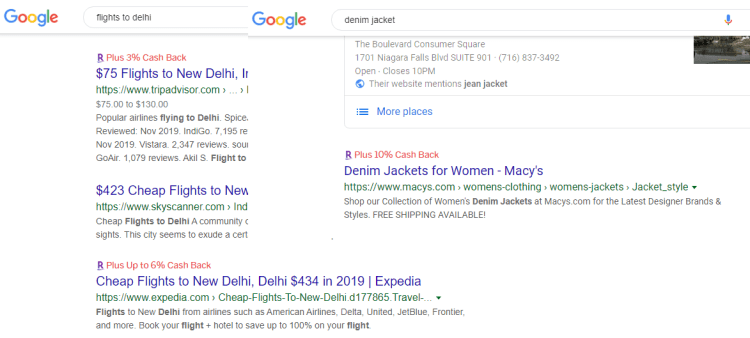
If you are aware of other ways to save money, comment below and I will update the post.
 Studycentrals